SudokuPad Extended Checks
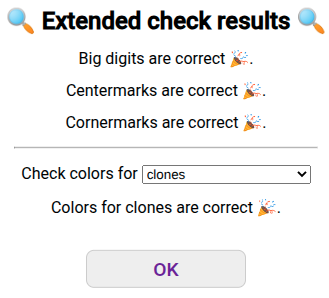
The extended checks user script allows you to check the progress of an unfinished puzzle. It is similar to the built-in checkmark but offers additional checks.
- Checks whether centermarks are consistent with the embedded solution
- Checks whether (box-) cornermarks are consistent with the embedded solution
- Checks whether colors match the entropy/parity/.... of the embedded solution
Installation and Usage
The user script needs Tampermonkey.
After you installed Tampermonkey, install the extended checks user script.
Any puzzle on SudokuPad will now show a green checkmark  on the bottom right.
Clicking that checkmark shows the extended checks dialog shown above.
on the bottom right.
Clicking that checkmark shows the extended checks dialog shown above.
Check Results Explained
Big Digits
The "big digits" checks whether all entered digits match the embedded solution. This is the only thing the built-in answer check checks for.
Centermarks
If one or more centermarks are entered in a cell, the checker will show a "wrong centermarks" error if none of those candidates match the embedded solution.
Cornermarks
This checker will check box-wise (or more generally, region-wise) cornermarks. If a region has one or more cornermarks for a digit, it is checked whether the digit appears in one of those positions. This part of the checker will ignore puzzles without regions (such as Latin squares) and regions that contain repeated digits.
Note for setters: Invisible 9-cell cages will not magically be treated as regions. Regions need to be specified via the "regions" constraint in SudokuMaker.
Colors
If you add colors to the grid, those can be checked as well. For the check to pass, cells colored with the same color have to belong to the same group, and cells with different colors have to belong to different groups. Cells with more than one color (this includes "flashed" colors) will be ignored. The available groupings are.
- Clones: Puts every digit in its own group, i.e., cells with the same color must contain the same digit.
- Parity (13579/2468): Cells with the same color must have the same odd/even parity.
- Modularity (147/258/369): Cells with the same color must have the same remainder when divided by 3.
- Entropy (123/456/789): Cells with the same color must be of the same low/medium/high group.
- Polarity (1234/5/6789): Cells with the same color must be of the same low/high group.
- Custom groups: Setters can define custom groups in their puzzles. Unlike the default groupings described above, custom groups are not bound to the digits in the solution but define groups of cells instead. This is useful for hybrid puzzles such as yin yang, loop puzzles, or chaos constructions.
Note for setters: If you want to add a custom "color solution" to your puzzle, please check out this SudokuMaker link. The "extendedChecks" custom constraint sets up a coloring check based on the selected cells. It needs the JSON postprocessing user-script, which is also linked in the custom constraint.
Lines
If a puzzle contains an embedded line solution, the lines drawn with the pen-tool will be checked against that. The check will only look at lines between centers of cells. This means it ignores "edge lines" (which start and end at corners of cells) and other pen-tool markings. Colors of lines are also ignored by the check.
Note for setters: If you want to add a custom "line solution" to your puzzle, please check out this SudokuMaker template. It needs the JSON postprocessing user-script, which is also linked in the custom constraint.
Experimental: Rewind Broken Puzzles
When you break a puzzle, you often want to go back to the point right before you broke it and continue your solve from there. The "rewind button" does exactly that. It will automatically perform undos ↶ until all the checks pass. It will not alter the "undo stack" so you can still use redo ↷ to see exactly what went wrong.
To enable it, go to the SudokuPad settings, look for the "experimental" section at the bottom, and toggle the option "Enable Rewinds in Extended Checks". A "rewind" button should now appear whenever you open the extended checks dialog in a puzzle with an error.
Note that all the checks will be performed with the same setting for coloring checks, so if you switched up your coloring scheme midway through the solve, it might rewind back very far. If this happens, you can still hit "redo" ↷ a couple of times to restore your progress.